- Published on
Making My Home AC Smart: Remote Control and Automation DIY
- Authors

- Name
- Kevin Fan
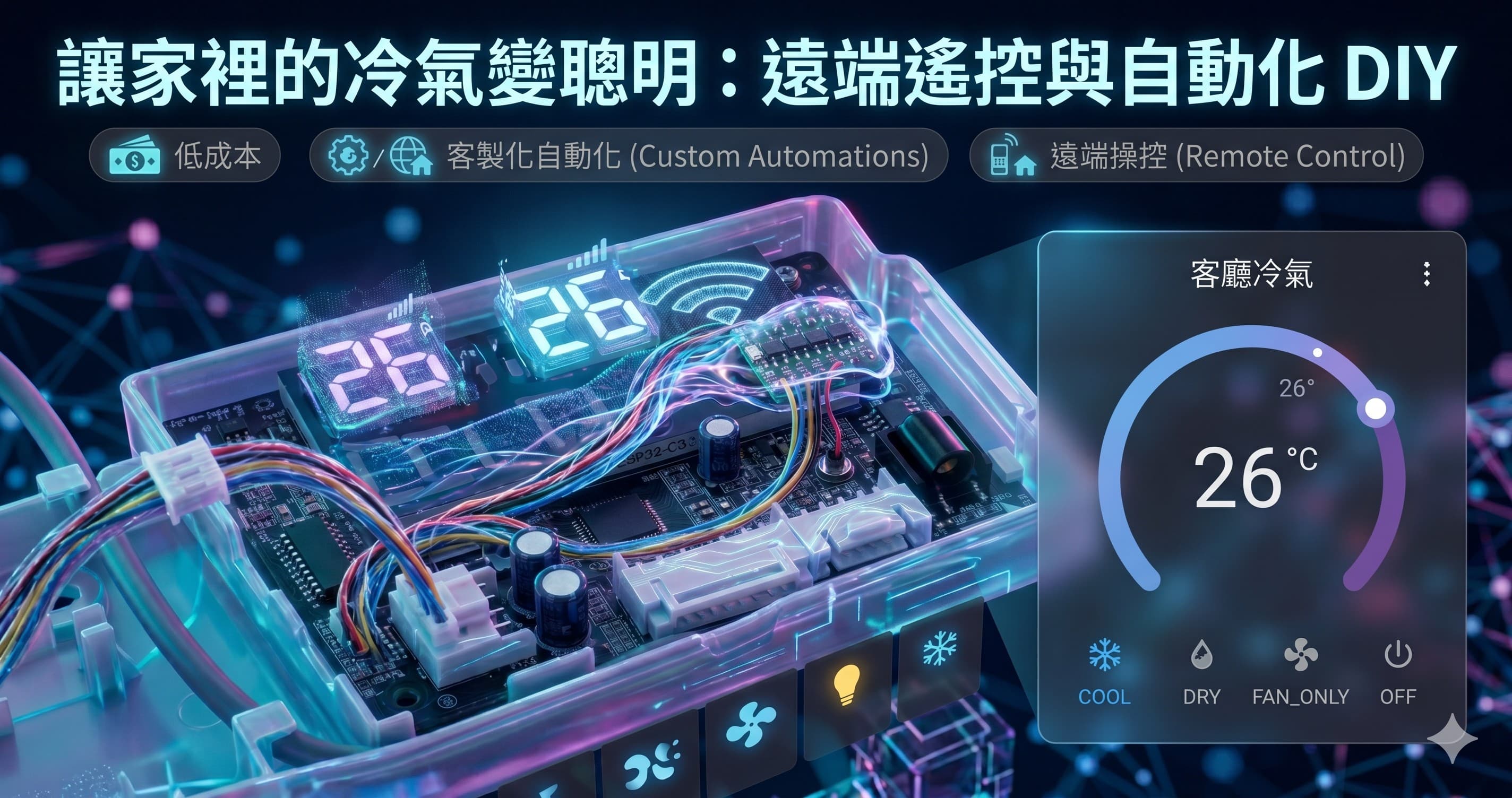
One day while doom-scrolling Threads, I saw @kunlin0813 share how, on his very first solder job, he wired his office's Hitachi AC into HomeKit — for under NT$100 in parts. Turns out even mindlessly scrolling Threads can teach you something hands-on. After reading it my fingers were itching, so I decided to make my own AC smart too.
Mine is a MAXE (Wansiyi) split-type AC, and normally I can only operate it with the remote while I'm in the room. What I actually wanted were two things it can't do out of the box: turn it on/off remotely from anywhere, and some automations — a sleep timer that shuts it off, an automatic anti-mold dry-out after it powers down, that kind of thing the AC will never do on its own. The vendor's connectivity module is both expensive and routes everything through their cloud, so I figured I'd just take it over myself with a single ESP32.
This post records the whole process: how the hardware connects, how to set up ESPHome, the pitfalls I hit along the way, and the genuinely fun part once I'd taken control — the automations — including one last little puzzle that looked simple but turned out to be surprisingly brain-bending.
Why DIY (instead of the vendor module)
| Vendor connectivity module | DIY (this project) | |
|---|---|---|
| Cost | A full module, not cheap | A few parts, much cheaper |
| Cloud | Goes through the cloud | Local, direct, never leaves home |
| Automation | Built into the app, limited | Every Home Assistant automation works |
| Ecosystem | Locked to their own app | Apple Home / Google / Alexa, your pick |
When I opened up the indoor unit's control box, the mainboard had KFR-35G printed on it — this is a Midea OEM model. In other words, this AC's MCU speaks Midea's UART protocol as its "native language." Conveniently, ESPHome's built-in and community-mature midea component can talk to it directly, so there's no need to reverse-engineer the protocol myself. Figuring out your unit's native protocol first is step one of the whole thing.
Hardware: one ESP32-C3 + a level shifter
You actually need very little:
| Item | Spec | Qty |
|---|---|---|
| ESP32-C3 SuperMini | Dev board | 1 |
| BSS138 level shifter | 4-channel | 1 |
| JST XH 2.54mm pigtail connector | 4-pin, 20cm | 1 |
There's a CN3 WIFI header (JST XH 2.54mm, 4-pin) on the AC's control box, rated 5V TTL, UART 9600 8N1. The problem is the ESP32-C3's GPIO is 3.3V — feeding 5V straight in will slowly damage it or even fry it, so you need a BSS138 bidirectional level shifter in between to translate 5V ↔ 3.3V.
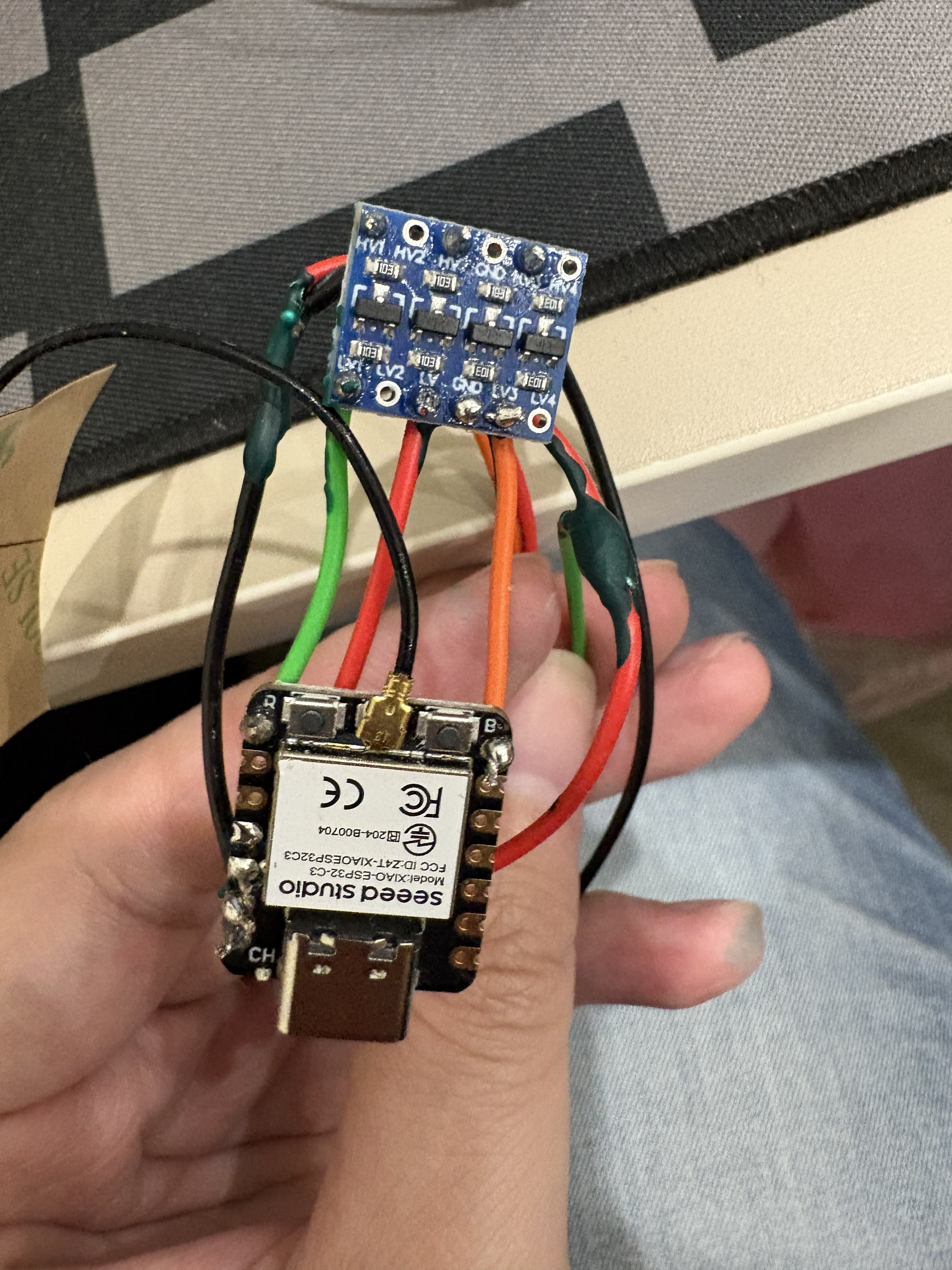
About the capacitor: A lot of guides suggest soldering a 470µF electrolytic cap across the ESP's 5V/GND to keep the compressor's startup inrush from dipping the voltage and brown-out-resetting the ESP. In my testing it's been perfectly stable without one, so I haven't added it; if your environment sees voltage drops, drop one in (mind the polarity — reverse it and it'll pop).
Gotcha #1: a multimeter, no oscilloscope
CN3 only has 4 pins, but telling apart which is +5V, GND, TX, and RX was harder than I expected — all I had on hand was a basic digital multimeter, no oscilloscope, so I could only measure static voltages and guess.
The first pitfall: the pin order on this unit is the exact opposite of the Midea convention. What I actually measured was pin1 = GND, pin4 = +5V (the convention is pin1 = +5V). Wire it per the pinouts you find online and you'll definitely get it wrong — you have to measure it yourself.
The second, and the nastiest one: the cleanest, most rock-steady 5V reading is not actually the power pin.
- The real +5V will "wobble slightly" when measured (there's ripple) — because the AC's MCU is running and drawing current periodically.
- That beautifully stable 5V is actually a pulled-up signal pin, backed by nothing more than a 10kΩ resistor, supplying ~0.5mA at most. Hook it up and the ESP's LED lights (fooling you), but the moment Wi-Fi kicks on and needs current, it brown-out resets instantly.
I nearly got fooled by that "beautiful 5V" myself. Remember this: the one that wobbles is the power.
Gotcha #2: can't tell TX from RX? Just guess
Both signal pins read a pulled-up 5V statically, so the multimeter simply can't tell which is TX and which is RX. The least-effort approach isn't to figure it out the hard way — it's: pick a direction, flash it, and watch the log; if you keep getting Response timeout, just swap tx_pin and rx_pin in the YAML and re-flash over OTA. No need to unplug anything, and swapping TX/RX won't damage anything — you just won't receive data.
⚠️ Safety note: Once it's connected to the AC, never plug the ESP's USB into your computer again. The AC's 5V ground is referenced to the 220V live wire — if the switching power supply's insulation ever breaks down, that ground carries 220V directly, and the USB cable becomes a path for 220V straight into your computer's motherboard. Best case it fries the board, worst case you get shocked. All firmware updates go over OTA.
Firmware: ESPHome's midea component
I split the ESPHome config into a "shared file + per-unit entry file": the shared file holds all the settings, and each AC has a small entry file that passes its name via substitutions and then !includes the shared file. That way both units (living room, bedroom) share one config.
An entry file looks like this:
# aircon-living.yaml — the living room unit
substitutions:
  device_name: maxe-aircon-living
  friendly_name: Living Room AC

packages:
  common: !include maxe-aircon-common.yaml
The key parts of the shared file:
esp32:
  board: esp32-c3-devkitm-1
  variant: ESP32C3 # spell this out for the ESP32-C3 — the connection is more stable

# Route the logger over USB Serial/JTAG, leaving UART0 for the AC
logger:
  hardware_uart: USB_SERIAL_JTAG

uart:
  tx_pin: GPIO21
  rx_pin: GPIO20
  baud_rate: 9600

climate:
  - platform: midea
    id: ac
    name: ${friendly_name}
    period: 1s
    beeper: true # the AC beeps when it receives a command (more on this later)
    supported_modes:
      - COOL
      - DRY
      - FAN_ONLY # fan-only, needed for the anti-mold dry-out
      # ...(HEAT / HEAT_COOL depending on the model)

# Once connected to the AC, everything goes over OTA — never plug in USB again
ota:
  - platform: esphome
    password: !secret ota_password
A few key points:
logger: hardware_uart: USB_SERIAL_JTAG: the ESP32-C3's logs are routed over the built-in USB Serial/JTAG, leaving the entire UART0 (GPIO20/21) for the AC so they don't fight over it.beeper: true: the AC beeps every time it receives a command, which is very handy during debugging (you can hear whether the command got through). This later turned into an interesting problem (see the final section).- HomeKit's thermostat only has off/cool/heat/auto — no "fan-only" or "dry." I added two extra template switches to fill that gap, so I can turn on fan-only/dry individually from the Apple Home app too.
A reception tip: if the ESP32-C3's built-in PCB antenna is weak and prone to dropping out, the simplest fix is to switch to a board with an external antenna connector — I later moved to a XIAO ESP32-C3 and once I attached the included antenna it's been rock solid.
Where Home Assistant runs: N100 + Proxmox + HAOS
My Home Assistant doesn't run on a Raspberry Pi — it runs on an N100 mini PC: I installed Proxmox VE (PVE) first, then spun up a HAOS (Home Assistant OS) VM on top of it.
Why HAOS instead of the Container/Core editions? Because installing add-ons is the easiest — HACS and all kinds of official/community add-ons install with a click, no need to wrangle Docker yourself. The N100 is plenty powerful and power-efficient, and I can run other services on PVE while I'm at it.
For installing HAOS on PVE, I followed this video: How to install Home Assistant OS on Proxmox.
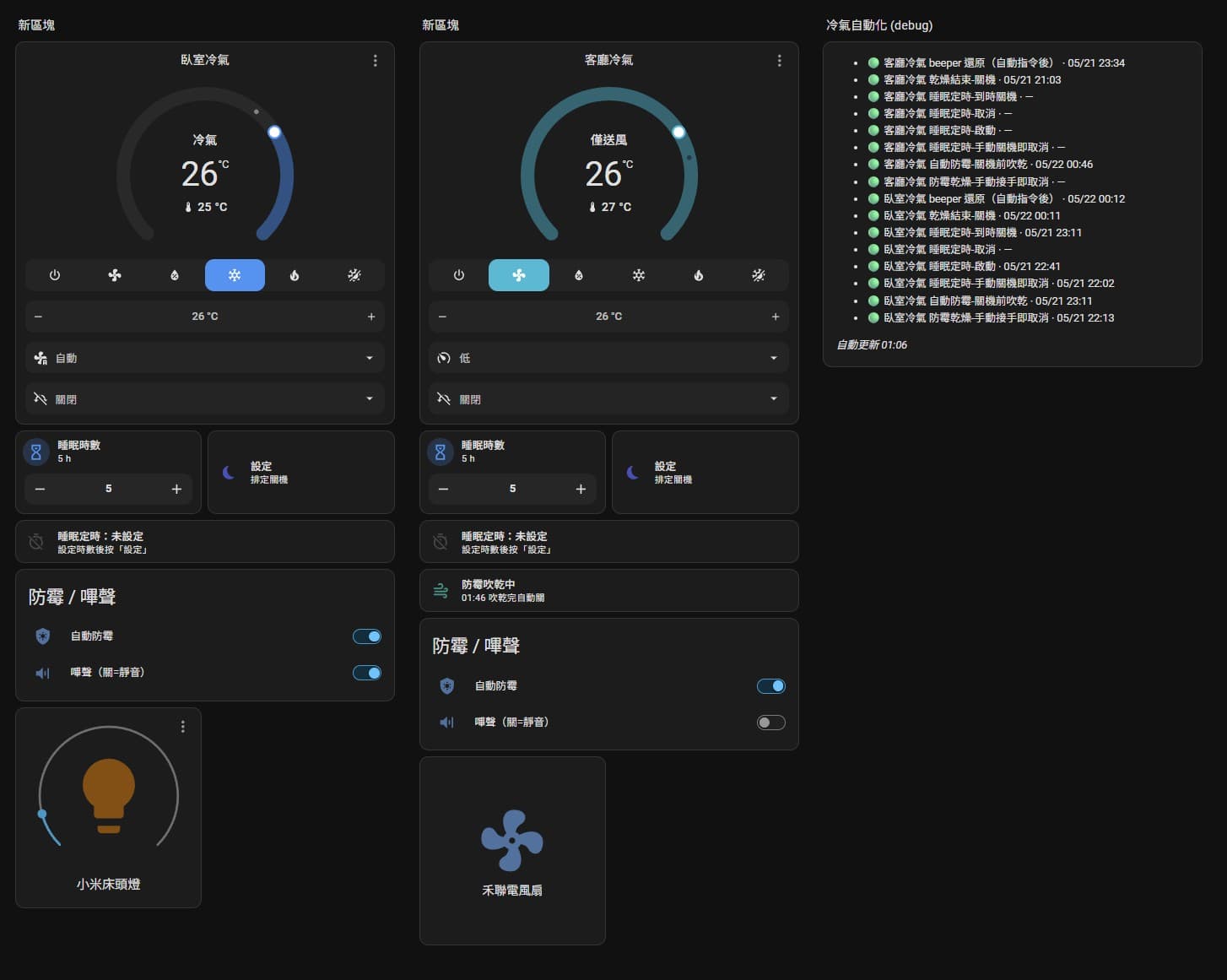
Once the AC's ESP is flashed and online, Home Assistant auto-discovers it and the climate entity just shows up. That's where the genuinely fun part begins.
The fun part: automations
The hardware only gets the AC "online" — the real value is in the automations. Everything below lives in Home Assistant packages (YAML) and has nothing to do with ESPHome. Entity IDs use placeholders (like climate.living) for illustration.
Auto anti-mold dry-out
After the AC shuts off, the evaporator is wet, and leaving it sealed up invites mold. So I set this up: whenever the AC is turned off from cool/dry (including via the remote), it automatically switches to fan-only and dries out for N minutes before actually shutting down.
- alias: Living Room AC anti-mold - dry out before shutdown
  trigger:
    - platform: state
      entity_id: climate.living
      from: [cool, dry]
      to: "off"
  condition:
    - condition: state
      entity_id: input_boolean.living_antimold_enabled
      state: "on"
  action:
    - service: climate.set_hvac_mode
      target: { entity_id: climate.living }
      data: { hvac_mode: fan_only }
    - service: timer.start
      target: { entity_id: timer.living_fan_dry }
      data:
        duration: "{{ (states('input_number.fan_dry_minutes')|float*60)|int }}"
When the dry-out countdown ends, another automation actually turns it off.
Sleep timer
Set N hours → it shuts off when time's up. That shutdown gets picked up by the "auto anti-mold" above and dries out, so a bedtime timer = timed shutdown + auto dry-out, all in one flow.
Gotcha #3: a leftover timer that shuts things off
The classic bug with this kind of "countdown + auto shutoff": while the dry-out/sleep countdown is still running, I manually switch the AC back to cool mode (I've taken over) — and then the old countdown hits zero and shuts the AC off anyway. You're left thinking, "I'm literally running the AC right now, why did it turn itself off?"
The fix is to add a few "abort" automations: when it detects that you've taken over manually (the climate state changed) or turned it off manually, it cancels the leftover countdown timer; and right before the countdown ends and is about to shut things off, it double-checks that the AC is really still in the state it should be before acting. Get the edge cases right, and this whole setup won't turn around and annoy you.
The finale: silence automations, keep the manual beep
Remember beeper: true? The AC beeps every time it receives a command. When I'm operating it myself during the day, that beep is great feedback — but the sleep-timer auto-shutoff and auto dry-out in the middle of the night beep too, and that's just noisy.
What I wanted was: commands issued by automations are silent, and commands I (or the remote) press by hand still beep.
ESPHome's midea component can toggle the beeper at runtime (midea_ac.beeper_on / beeper_off), so I exposed it as a switch. The most straightforward version (v1) is a master toggle on the dashboard — turn it off at bedtime, back on in the morning. Lowest cost, but manual.
The advanced version (the focus of this post) is "silence by source": every automation that sends a command turns the beeper off before sending, then restores it afterward. Sounds simple, but there's a race condition hiding in here.
The race condition
When the sleep timer fires its shutoff (sleep_finished), it chains into the auto anti-mold (antimold) to switch to fan-only. So two automations are running almost simultaneously. If each one does "turn beeper off → send command → turn beeper back on," then the instant sleep_finished turns the beeper back on collides with the "switch to fan-only" command antimold is about to send — and that beep leaks out.
The fix: debounced restore + respect a manual mute
I pulled the "restore beeper" step out of every individual automation and turned it into a single, independent restore automation:
Only when both timers — the sleep countdown and the dry-out countdown — have been idle for a full 10 seconds do we turn the beeper back on.
That 10-second debounce neatly absorbs the sub-second gap between sleep_finished → antimold; it only restores after the whole chain has run and the dust has settled, so no beep leaks.
There's one more behavior I wanted: if I'm the one who manually left the beeper off, an automation shouldn't take it upon itself to turn it back on. For that I added a hidden flag, input_boolean.living_beeper_restore_pending:
- When muting: only if the beeper was on to begin with do we set the flag, then turn it off.
- When restoring: only if the flag is set do we restore.
So a beeper you turned off yourself (no flag set) will never get turned back on by an automation.
The mute snippet (placed at the front of every automation that sends a command):
- if:
    - condition: state
      entity_id: switch.living_beeper
      state: "on"
  then:
    - service: input_boolean.turn_on
      target: { entity_id: input_boolean.living_beeper_restore_pending }
    - service: switch.turn_off
      target: { entity_id: switch.living_beeper }
    - delay: "00:00:01" # wait for the ESP to apply the flag so the command packet carries "no beep"
The restore automation:
- alias: Living Room AC beeper restore (after automated commands)
  trigger:
    - platform: state
      entity_id: timer.living_sleep
      to: "idle"
      for: "00:00:10"
    - platform: state
      entity_id: timer.living_fan_dry
      to: "idle"
      for: "00:00:10"
  condition:
    - condition: state
      entity_id: input_boolean.living_beeper_restore_pending
      state: "on"
    - condition: state
      entity_id: timer.living_sleep
      state: idle
    - condition: state
      entity_id: timer.living_fan_dry
      state: idle
  action:
    - service: switch.turn_on
      target: { entity_id: switch.living_beeper }
    - service: input_boolean.turn_off
      target: { entity_id: input_boolean.living_beeper_restore_pending }
The end behavior:
- You did nothing (beeper left on) + an automation shuts off / dries out → silent throughout, auto-restored to on after the cycle.
- You left the beeper off yourself → automations still run silently, and it stays off after the cycle, never sneakily turned back on.
- You / the remote operate manually → it beeps as usual.
Takeaways
- Low cost, fully local with no cloud, and every Home Assistant automation is at your disposal — great bang for the buck.
- The biggest hardware pitfalls are identifying the power pin (the one that wobbles is the +5V) and the pinout (always measure it yourself, don't trust the convention).
- The real value is in the automations; and the devil of automations is in the edge cases — leftover timers and chained-trigger race conditions. Leave them unhandled and the automation turns into a nuisance instead.
- The full source (ESPHome + Home Assistant packages) is open-sourced on GitHub: kevinypfan/esp32-aircontroller.
If you've got a Midea-OEM AC at home, give it a try — and feel free to share your own wiring and improvements!